Login Page
The page allows registered users to identify themselves and enter the website.This page will not be displayed, for already connected users (with session cookie), that will be redirected to the portal page.
Page url is: Domain/Login. The HTML is flex (responsive) for any mobile device / browser view port size.
Web Page Structure
| Body id | Page Prefix | Fields List |
|---|---|---|
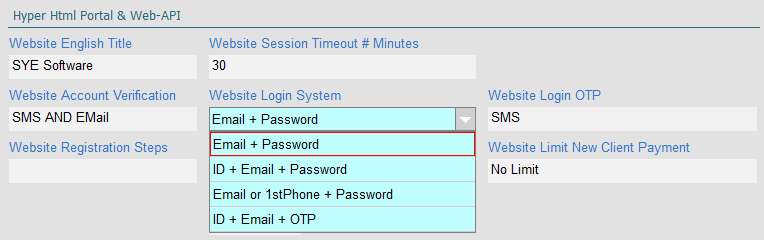
| Login | Login_Page | by the field [hyp_Server Side Automations Settings].[Website Login System] |
| Use this id for custom css and js |
Edit this key in Website Content
You can add title and logo to the window... |
|
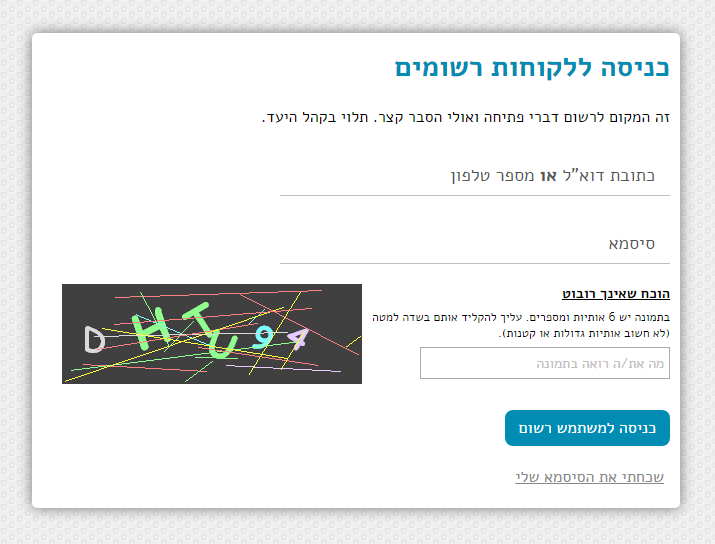
Before the form ends, a Google Captcha will be placed. In case that you don't have credentials for Google, then sye simple captcha will be placed (like in the screen capture above).
Sign In (submit) Button
The following actions taking place when posting data to this form. The process will stop on a failure, with a message to the end user.- Check that the form was posted from an Html page, generated by this site. WAF will check amount of calls from user's IP address.
- Check that all mandatory fields were filled.
- Check the Captcha Test (simple or google.com/recaptcha). IF failed then reply the html with the fields values and let the user try again.
-
WAF test for login fields (without the password), after 3 failures the user is blocked with the message:
'You have tried to sign-in too many times. Please wait an hour to try again.'. -
Query for a client, According to the [Website Login System]fields list.
-
ID field from this form, is being compared to both [hyp_Clients].[ID Number]and[ID Number 2]fields !
-
Email field from this form, is being compared to [hyp_Clients].[Email], as same string but NOT Case Sensitive.
Please pay attention:
The hyper CRM support storing more than one email address in the same field while separated with the ; char (e.g. alicia@company.com; brad@company.com).
This type of usage will FAIL the login function. So, in an account that use the web portal it is mandatory to use a single address and without ; of course. -
Primary phone field from this form, is being compared to [hyp_Clients].[1st Phone], as same string including prefix.
-
ID field from this form, is being compared to both
- Password field must be identical (case sensitive).
-
In RARE case that query found the same credentials for more than a single account, The process will halt with a popup message:
'This client file is Locked for changes. Please contact our sales or support teams. (21)'.
Please pay attention to the error number (21), guide your team about this code.
* This error may only be caused by the Advanced API functions, when external systems may push anything they wish into hyper. -
If one time password is enabled, by the field [hyp_Server Side Automations Settings].[Website Login OTP],
Then the user will be transferred to the'Login_2FA'page.
Otherwise, login is complete and the user will be transferred to the'Portal'router (to main menu, or to continue on boarding process). -
CRM Condition: [hyp_Clients].[Handling Status]CANNOT have value 3 (Client Not Interested).
[hyp_Clients Website Ext. Record].[Account Status]CANNOT have value 0 (Blocked cannot Sign-in). -
When client have more than a single account, The process will select the lowest client number with the highest
[hyp_Clients].[Handling Status], as the primary account for login.
Remember that "InActive / Suspended" accounts are out of this query, This is the solution in case that your client desert an old account. -
The user will be transferred to the 'Login_2FA'page.