Defining Website Content via Text Components
The web application retrieves its HTML content and email templates from the hyp_Website Text table.For professional HTML styling, it is recommended to use the integrated code editor rather than the standard word processor.
* To learn more about this table, view the technical documentation here.
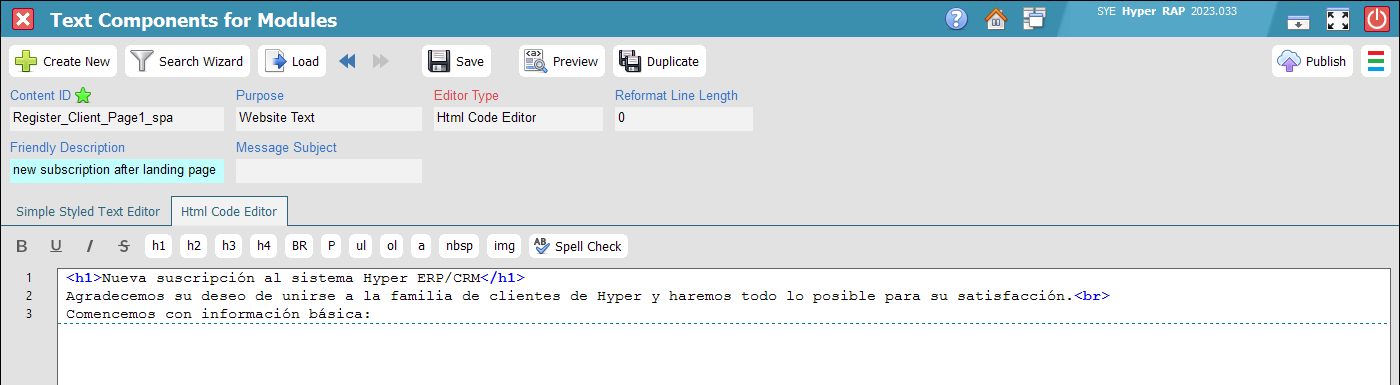
Language Codes and Content IDs
Each Content ID must include a three-letter language suffix to ensure correct localization.Use "_eng" for English, "_spa" for Spanish, "_heb" for Hebrew, "_ara" for Arabic, etc. Refer to the Hyper Client manual for a full list of supported codes.
In this guide, all examples use the "_eng" suffix as a standard convention.
Index of HTML Content Components
For all items in this category, set the "Purpose" field to "Website Text".| Content ID | Description and Usage Examples |
|---|---|
| Footer_Credits_eng |
Defines the footer copyright notice, legal disclaimers, and company branding.
© 2026 All rights reserved to SYE Software Industries Ltd.
♥ Content is phrased for all genders. ♦ This site is under active development; some content may be subject to change. |
| Footer_Links_eng |
A list of HTML anchor tags (<a>) that are rendered as styled buttons in the footer.
<a target="_blank" href="https://sye.co.il/About">About Us</a>
<a target="_blank" href="Media/contract.pdf">Legal Contract</a> |
| Html_No_Page |
An optional key used to customize the "404 - Page Not Found" error page.
The "Message Subject" field can be used for the H1 title, while the main editor contains the body content. |
|
Register_Client_Page1
Register_Client_Page2 |
Defines the H1 title and introductory text displayed before the registration fields and CAPTCHA. |
| Dataport_Success |
The HTML response displayed by the Dataport after a successful form submission (e.g., client registration or service ticket).
Note: Define the H1 title in the "Message Subject" field. Use the {#Reference} placeholder to dynamically display the generated opportunity or ticket number. |
|
Login_Page
Password_Recovery_Page Password_Recovery_Page_Step2 |
Defines the H1 title and introductory text for authentication pages. The <form> element is rendered after this content. |
| Password_Recovery_PageDone | A static confirmation page displayed upon completing the first stage of the recovery process. This page does not contain a form. Ensure the H1 title is defined in the Subject field. |
|
Email_Owner_Verification_ThanksPage
Phone_Owner_Verification_ThanksPage |
A "Thank You" confirmation message (popup or static page) displayed after successful verification. Use the "Message Subject" field for the H1 title.
If left blank, the system defaults to "Your email address is confirmed" or "Your phone number is confirmed." |
|
Pelecard_Error
Pelecard_Good |
Customized feedback pages for payment transaction outcomes (success or failure) processed via the Pelecard gateway. |
Index of Email Templates
For these items, set the "Purpose" field to "Website Mail Template" and append the appropriate language code.Email templates utilize a unique field named Wraparound to control the layout structure:
- Logo TD + Content TD, Padding + Border: The standard Hyper template. Provides a structured look with minimal configuration.
- Logo TD + Content TD (no padding, no border): Optimized for implementing full-width banners (PNG/JPG) while maintaining the system's core CSS.
- Center TD, Empty Content, Basic CSS: Provides maximum design flexibility with minimal system-imposed styling.
- None: Raw output. Reserved for specific edge cases where no system wrapping is required.
| Content ID | Description and Usage | Merge Fields Source |
|---|---|---|
| Password_Recovery_Email |
The email sent to users who request a password reset. It must include a recovery link.
Use the HTML structure <a href="{#link}"> where {#link} serves as the placeholder for the temporary security token URL.
|
hyp_Clients |
| 2FA_Email_Code |
Used for Two-Factor Authentication (2FA) via email. Use the {#code} tag as a placeholder for the 7-digit verification code.
Since email delivery is cost-effective, you are encouraged to use rich media and branded graphics. |
hyp_Clients |
| Email_Owner_Verification |
The verification email sent to confirm a new website account.
Follow the same implementation as the Password Recovery email using the {#link} placeholder. |
hyp_Clients |
Index of Mobile Messaging (SMS / WhatsApp)
For these items, set the "Purpose" field to "Website SMS Template" and append the language suffix.| Content ID | Description and Usage | Merge Fields Source |
|---|---|---|
| 2FA_Phone_Code | Used for 2FA verification via SMS or WhatsApp. Keep the text concise and include the {#code} tag for the 7-digit code. | hyp_Clients |
| Phone_Owner_Verification |
Custom text for account verification via mobile messaging.
Keep the message brief. Use the {#link} placeholder for the full HTTPS URL. Hyper generates the URL automatically; an optional "URL Shortener" can be configured in the Extended App Settings. |
hyp_Clients |